Email Design Inspiration by Industry: How Segmented Tools Help Teams Find Relevant Examples Faster
Finding a beautiful email is easy. Finding a useful email example for the campaign you actually need to build is harder. A polished ecommerce sale email may not help a SaaS team explain a new feature. A nonprofit fundraising appeal may use visual and emotional cues that make little sense for a B2B renewal notice. This is why email design inspiration by industry has become so valuable for email designers, lifecycle marketers, CRM managers, and creative teams working under real campaign constraints.
Generic inspiration libraries often create the illusion of progress. Teams collect attractive screenshots, discuss color palettes, and admire clever hero sections, but the examples may not match the audience, lifecycle stage, content density, compliance requirements, or conversion goal. Industry-segmented inspiration tools solve that problem by narrowing the field. Instead of browsing hundreds of unrelated emails, teams can compare patterns used by similar verticals, then adapt those patterns into responsive, accessible campaigns that fit their brand.
See also: email design inspiration libraries
For a site like Email Design Inspirations, the goal is not to encourage copying. The goal is to help teams understand why an email works: how hierarchy directs attention, how typography supports scannability, how color guides action, how layout survives mobile rendering, and how calls to action align with audience intent. When examples are organized by industry, those decisions become easier to evaluate and faster to apply.
Why Generic Email Inspiration Falls Short for Real Teams
Broad email galleries are useful for spotting trends, but they can become inefficient when a team has a specific job to do. A lifecycle marketer building an onboarding sequence needs different inputs than a designer producing a seasonal retail campaign. A CRM manager preparing a healthcare reminder must consider trust, clarity, and caution in ways that a fashion launch email may not. Without segmentation, teams spend too much time filtering irrelevant examples and too little time identifying practical design patterns.
The biggest limitation of generic inspiration is context loss. An email may look impressive as a standalone screenshot, but email design is never just visual decoration. It is a response to a goal, audience, product type, message complexity, and technical environment. Industry matters because it influences nearly every design choice.
- Merchandising volume: Ecommerce emails may need product grids, pricing, badges, ratings, and secondary categories without overwhelming the reader.
- Formality and trust: B2B, finance, healthcare, and professional services often need restraint, clear proof points, and credibility signals.
- Emotional intensity: Nonprofit and fundraising emails may rely on story, human imagery, urgency, and donation clarity.
- Education burden: SaaS and technology emails often need to explain concepts, features, integrations, or workflows before asking for action.
- Compliance and clarity: Regulated industries require careful language, accessible layouts, and transparent disclaimers.
- Rendering constraints: Complex modules, background images, custom fonts, and interactive ideas must be judged against email client support and mobile behavior.
When teams search for email design inspiration by industry, they are not simply asking for a prettier gallery. They are asking for examples with relevant constraints. The best examples help a team answer questions such as: How much copy can this audience tolerate? Where should the primary CTA appear? Does the hero need a product image, a customer outcome, a testimonial, or a benefit statement? Should the email feel promotional, educational, urgent, reassuring, or consultative?
How Industry-Segmented Inspiration Tools Work and What to Look For
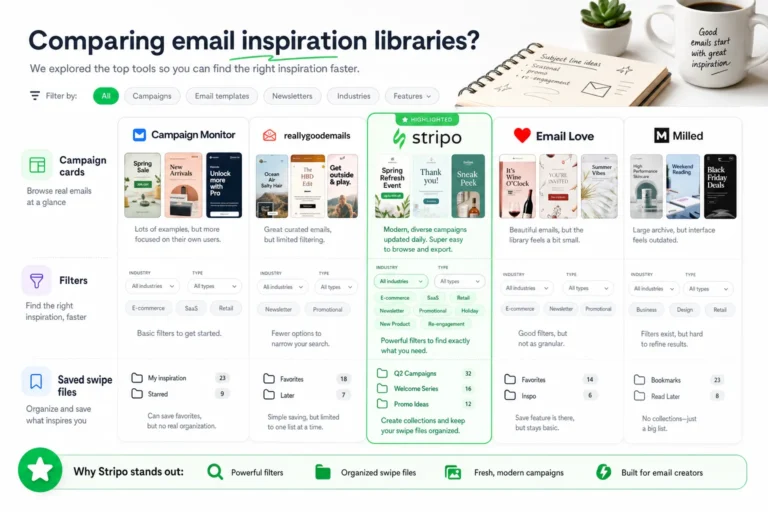
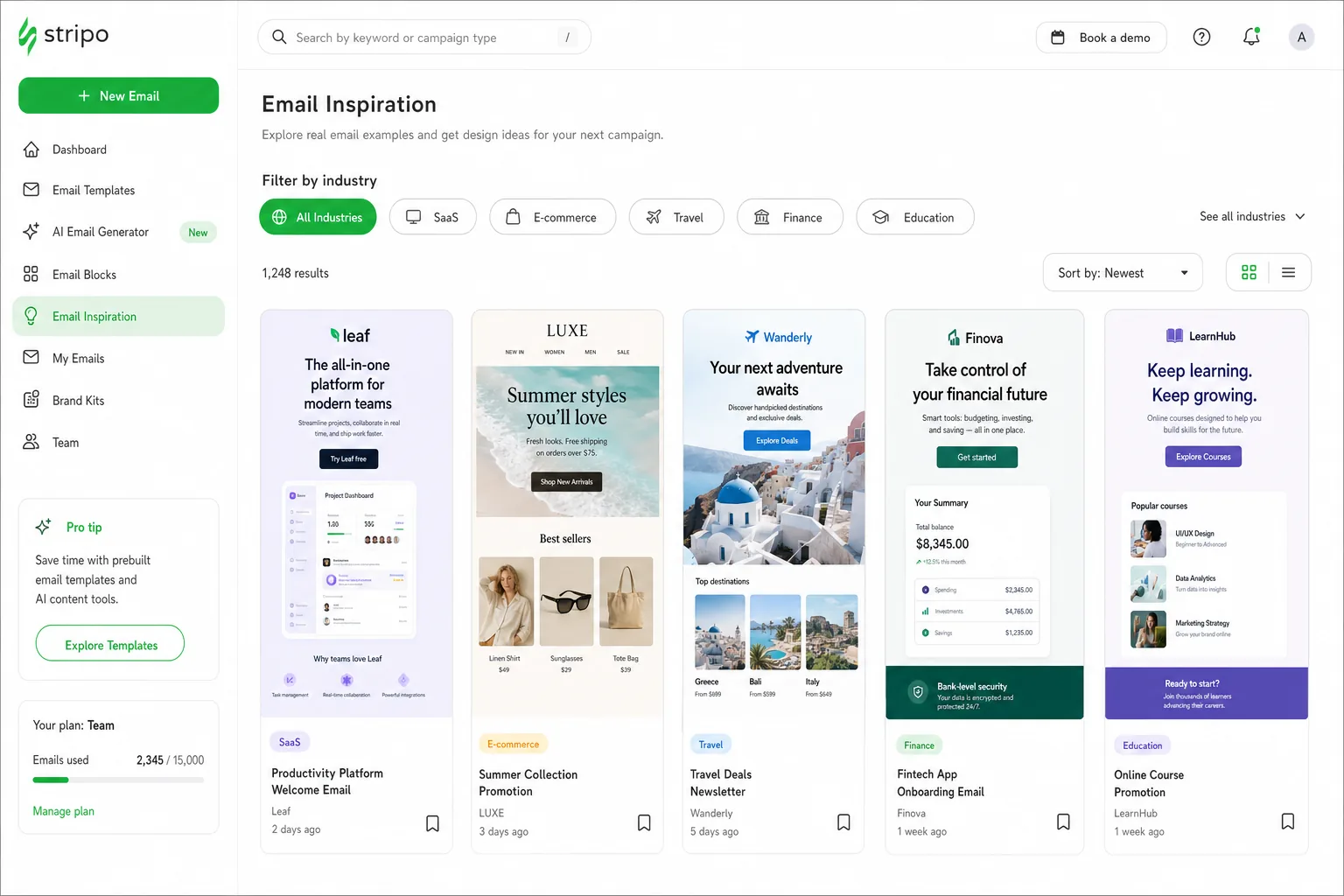
Industry-segmented inspiration tools organize examples so teams can move from broad browsing to purposeful selection. Instead of starting with a blank search box, users can filter by vertical, campaign type, design pattern, content structure, or visual characteristic. This helps designers and marketers compare like with like.
A strong inspiration tool should support several layers of filtering. Industry is the first layer, but it should not be the only one. A SaaS launch email, a SaaS onboarding email, and a SaaS reactivation email may all belong to the same vertical, yet they require different design logic. Similarly, ecommerce examples should be searchable by sale announcement, product drop, abandoned cart, replenishment, loyalty, editorial commerce, or post-purchase education.
Useful filters and attributes
- Industry filters: Ecommerce, SaaS, agencies, nonprofits, education, hospitality, finance, healthcare, B2B services, media, and other verticals.
- Campaign type tags: Welcome, onboarding, launch, promotional, newsletter, retention, winback, event, donation, transactional, and lifecycle nurture.
- Layout patterns: Single-column editorial, product grid, split hero, card-based modules, testimonial block, comparison table, checklist, event agenda, or long-form story.
- CTA attributes: Button style, placement, repetition, wording, contrast, hierarchy, and whether secondary CTAs compete with the primary action.
- Typography and copy density: Headline scale, paragraph length, scannability, font pairing, mobile readability, and use of emphasis.
- Responsive structure: How modules stack, whether images remain meaningful on small screens, and whether tap targets are large enough.
- Content blocks: Hero area, proof points, product cards, donation modules, pricing callouts, social proof, FAQs, disclaimers, and footer structure.
When evaluating a tool, look beyond the number of examples. Depth, categorization, and usefulness matter more than volume. A smaller library with accurate filters and current, well-categorized emails can be more productive than a large archive of unsorted screenshots. Teams should ask whether the tool helps them move from inspiration to execution.
Practical evaluation criteria include:
- Depth of vertical coverage: Does the tool include enough examples from your industry to reveal repeatable patterns?
- Recency: Are examples current enough to reflect modern mobile behavior, accessibility expectations, and design conventions?
- Quality of categorization: Can you filter by campaign goal, not only by visual style?
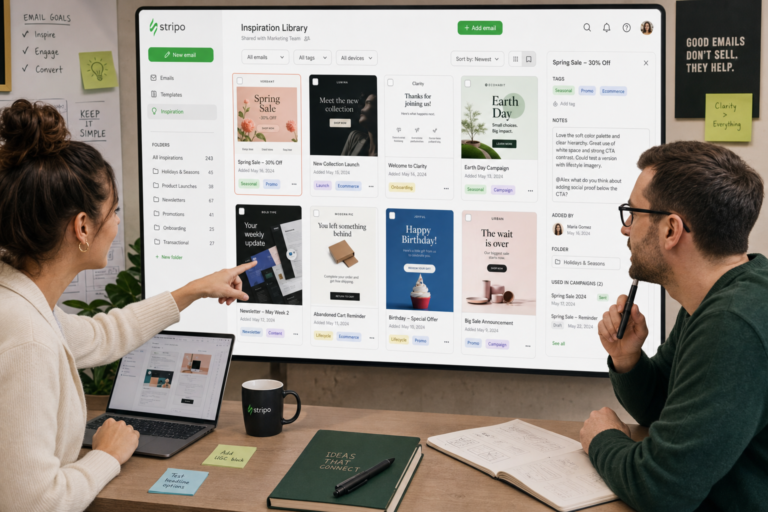
- Shareability: Can designers, copywriters, CRM managers, and stakeholders review the same references easily?
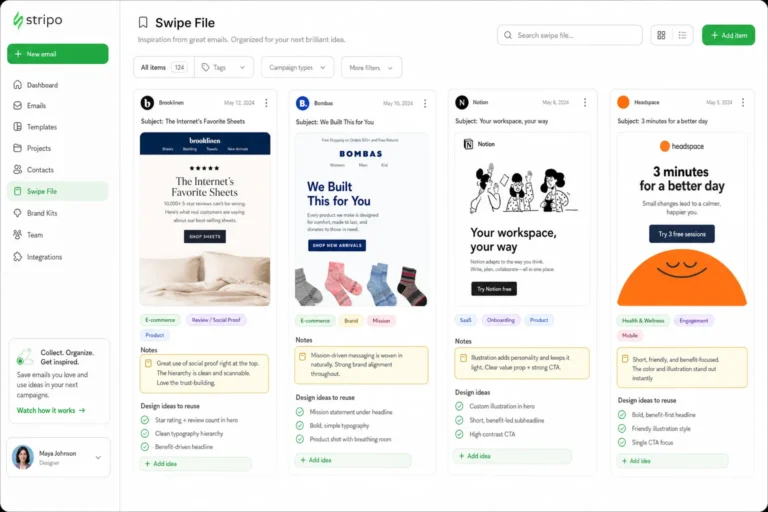
- Annotation potential: Can your team capture notes about hierarchy, CTA logic, accessibility, and responsive concerns?
- Execution support: Does the library help you identify components you can translate into your own email design system?
This is also where accessibility and email UX standards should enter the process. Teams should leave room to validate inspiration against authoritative guidance on readable typography, contrast, semantic structure, alt text, and usable interactive states. A visually strong example is only useful if its ideas can be adapted into an accessible, responsive email experience.
Use inspiration as a diagnostic tool, not a shortcut. The question is not “Can we make something that looks like this?” It is “Which design decision from this example solves a problem we also have?”
What Email Design Patterns Differ by Industry
Industry segmentation is powerful because each vertical tends to prioritize different patterns. The same visual device can serve different purposes depending on the business model. A card layout in ecommerce may display products; in SaaS, it may introduce features; in a nonprofit email, it may break down donation impact; in B2B, it may organize proof points or resources.
Ecommerce
Ecommerce inspiration usually needs to balance speed, clarity, and merchandising. Readers often scan quickly, so hierarchy must make the offer, product category, and next step immediately obvious. Strong ecommerce examples often include product grids, price anchoring, discount hierarchy, urgency cues, recommendation modules, reviews, and shoppable sections.
When reviewing ecommerce examples, pay attention to how many products appear before the first CTA, whether the discount message competes with the brand message, and how modules stack on mobile. A desktop grid can become a long scroll on a phone. The best inspiration shows how to preserve momentum without hiding key products too far down the email.
SaaS and technology
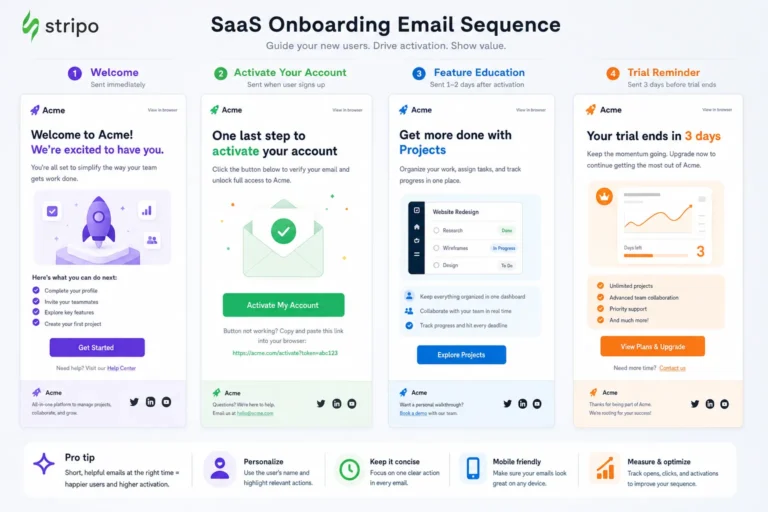
SaaS emails often need to educate before they convert. Inspiration in this category should show how teams explain features, benefits, workflows, integrations, or product updates with concise copy and clear visual support. Useful patterns include benefit-led heroes, step-by-step onboarding modules, feature cards, customer proof, screenshots with annotations, and simple CTAs that match product intent.
For SaaS, the CTA should be especially precise. “Learn more” may be too vague for an onboarding email where the desired behavior is “Connect your calendar” or “Create your first report.” Industry-segmented examples help teams see how other product-led messages simplify technical content without flattening the value proposition.
Agencies and professional services
Agency emails often need to establish credibility quickly. Portfolio-style layouts, case study teasers, service positioning blocks, awards, client logos, testimonials, and thought leadership modules are common. The design should feel polished, but it must also communicate expertise. Overly decorative layouts can weaken the message if proof points are buried.
Good agency inspiration shows how to create a visual rhythm between insight and evidence. A strong email may lead with a sharp point of view, support it with a case study or result-oriented summary, and direct readers toward a consultation, article, webinar, or portfolio page.
Nonprofits
Nonprofit email design often depends on emotional clarity. Storytelling, imagery, donation hierarchy, and urgency must work together. The challenge is to inspire action without making the email feel cluttered or manipulative. Useful examples show how to pair a human story with a direct donation CTA, how to explain impact at different giving levels, and how to repeat the donation action without overwhelming the reader.
For more context, according to Smashing Magazine offers additional background on this topic.
See also: email design inspiration platforms
When reviewing nonprofit inspiration, examine the balance between narrative and action. Does the email make the need clear? Is the CTA visible early? Are donation amounts easy to understand? Does the design preserve dignity and trust? These questions are more important than whether the email follows a fashionable visual style.
B2B, education, and hospitality
B2B emails often require consultative hierarchy. Whitepaper promotions, webinar invites, product updates, account-based nurture, and renewal communications may use structured content blocks, proof points, quotes, comparison tables, and resource cards. The design should reduce friction and help a busy reader understand relevance quickly.
Education emails may need to communicate deadlines, program value, event details, faculty credibility, or student outcomes. Hospitality emails often lean on imagery, seasonal context, packages, location cues, and booking CTAs. In both cases, industry-specific inspiration helps teams choose the right emphasis: information clarity for education, desire and ease of booking for hospitality.
How to Turn Inspiration Into a Usable Design System
The best teams do not keep inspiration as a random folder of screenshots. They turn it into a structured reference system that informs future campaigns. This is where industry-segmented inspiration becomes operational. It gives teams a way to translate external examples into internal design decisions without copying.
A practical workflow looks like this:
- Capture the example: Save the full email screenshot and, when possible, a mobile view. Include the industry, campaign type, and apparent goal.
- Annotate the hierarchy: Mark the hero, primary message, supporting proof, CTA sequence, visual breaks, and footer structure.
- Identify reusable components: Look for modules such as product cards, testimonial blocks, feature steps, donation tiers, event details, and comparison tables.
- Map to campaign goals: Label each example by the job it performs: educate, sell, activate, retain, reassure, invite, upsell, or win back.
- Translate into brand rules: Decide how the idea would work with your typography, color palette, image style, tone of voice, and spacing system.
- Check accessibility and responsiveness: Evaluate contrast, text size, button size, image dependence, alt text needs, and mobile stacking.
- Create an internal swipe file: Organize examples by industry, lifecycle stage, and component type so future projects start faster.
For example, an ecommerce team might save a product grid pattern not because they want to copy the visual style, but because the module solves a merchandising problem: it shows multiple categories while keeping one dominant offer. A SaaS team might save an onboarding email because its three-step structure reduces cognitive load. A nonprofit team might save a donation module because it explains impact clearly at several contribution levels.
Translating inspiration into a system requires discipline. Typography decisions should support readability, not simply mimic a stylish layout. Color should establish hierarchy and meet contrast needs, not only create mood. Spacing should make modules scannable on mobile. CTA placement should follow the reader’s decision path. Every borrowed idea should be reinterpreted through brand, audience, lifecycle stage, and email client constraints.
It is also important to separate pattern from surface. The pattern might be “lead with a problem, show three proof points, repeat the CTA after social proof.” The surface might be a specific gradient, illustration style, or type treatment. Teams should preserve the useful pattern and redesign the surface in their own brand language.
Common Mistakes When Using Inspiration Libraries
Inspiration libraries are most useful when teams evaluate examples critically. The most common mistake is overfocusing on aesthetics. A beautiful email can still fail as a reference if it hides the CTA, depends on image-only text, uses low contrast, or does not match the campaign’s audience intent. Visual polish is not the same as strategic fit.
Another mistake is ignoring mobile rendering. Many emails look balanced in a desktop screenshot but become exhausting on a phone. Multi-column modules may stack poorly. Long hero images may push the CTA too far down. Small text in product cards may become unreadable. If an inspiration tool does not help teams consider mobile-first structure, the team should build that review step into its own process.
Teams also run into trouble when they mix industries without context. Borrowing an urgency-heavy ecommerce pattern for a B2B renewal message may feel aggressive. Using a dense B2B resource layout for a hospitality promotion may flatten the emotional appeal. Cross-industry inspiration can be valuable, but only when the team understands which part of the pattern is transferable.
Other pitfalls include:
- Using outdated examples: Older emails may rely on design conventions, image treatments, or coding assumptions that no longer fit current expectations.
- Saving too many references: A large unfiltered swipe file slows decisions instead of speeding them up.
- Ignoring content reality: A minimal layout may not work if your campaign requires legal copy, multiple products, or detailed event information.
- Copying visual style too closely: Inspiration should lead to interpretation, not imitation.
- Skipping stakeholder alignment: Designers, copywriters, and CRM managers should agree on why an example is relevant before it shapes the campaign.
To avoid generic design drift, evaluate every example against three questions: Does this match our business goal? Does it fit our audience’s intent and stage? Can we implement the pattern accessibly across major email clients? If the answer is no, the example may still be attractive, but it is not the right reference for the campaign.
A Fast Framework for Choosing the Right Examples
When deadlines are tight, teams need a simple way to choose useful references quickly. The following framework can help designers and marketers find actionable email design inspiration by industry in minutes rather than hours.
- 1. Define the campaign goal: Decide whether the email needs to sell, educate, onboard, retain, reactivate, invite, fundraise, or reassure.
- 2. Choose the industry filter: Start with your vertical so the examples reflect similar audience expectations and constraints.
- 3. Narrow by email type: Filter for the closest campaign format, such as promotional, welcome, product launch, newsletter, donation appeal, event invite, or lifecycle message.
- 4. Inspect the hierarchy: Look at what appears first, how quickly the value is clear, where proof appears, and whether the CTA sequence makes sense.
- 5. Review mobile implications: Imagine the modules stacked on a narrow screen. Check whether the example would still be scannable and actionable.
- 6. Identify one transferable pattern: Save the example only if you can name the specific idea you will adapt, such as a pricing module, story structure, CTA placement, or feature breakdown.
- 7. Add implementation notes: Record accessibility considerations, content requirements, design system components, and any email client constraints.
This framework keeps teams from collecting inspiration for its own sake. It encourages practical selection, faster collaboration, and better creative decisions. A designer can explain the visual system. A marketer can connect the example to the campaign goal. A CRM manager can flag lifecycle and segmentation implications. Together, the team moves from “this looks nice” to “this pattern helps us solve our problem.”
Industry-segmented inspiration is especially useful for teams building across multiple verticals. An agency can compare nonprofit, SaaS, ecommerce, and B2B patterns without forcing every client into the same template. An in-house lifecycle team can build separate swipe files for acquisition, onboarding, retention, and winback. A designer can explore visual hierarchy and layout options while still respecting the content demands of the campaign.
The result is not a generic email that resembles everything else in the inspiration library. The result is a more relevant, responsive campaign built from informed decisions. Explore industry-segmented inspiration to find email examples that match your vertical, campaign goal, and design constraints, then use those examples to build better emails faster.