SaaS Onboarding Email Examples: Design Inspiration for Product Activation Emails
Great SaaS onboarding is not only a product experience. It is also an email design problem. Users sign up with intent, but that intent can fade quickly if the first messages are dense, vague, or visually hard to act on. The best SaaS onboarding email examples make the next step obvious, reduce uncertainty, and help the user reach activation without forcing them to decode the product on their own.
For email designers, lifecycle marketers, and SaaS growth teams, onboarding email inspiration is most useful when it can be translated into a working sequence. A beautiful layout is not enough. The email needs a clear hierarchy, a mobile-friendly structure, accessible text, and a call to action that matches the user’s current stage. This article breaks down the patterns behind effective onboarding emails so you can browse examples more critically, compare layouts, and turn inspiration into a responsive sequence that drives product activation.
See also: email swipe file tools
Why SaaS onboarding emails matter after signup
Signup is not activation. A user may create an account, open the welcome email, and still never experience the value that made them interested in the product. In many SaaS flows, the gap between registration and value is filled with steps: confirm an email address, complete a profile, import data, invite teammates, install a script, connect an integration, or create the first project. If the onboarding sequence does not guide users through these steps, the product experience feels harder than it needs to be.
SaaS onboarding emails should do three practical jobs. First, they should reduce friction by clarifying the next action. Second, they should set expectations about what happens next. Third, they should reinforce the benefit of completing the step. The user should understand not only what to do, but why doing it matters.
This is where onboarding differs from purely transactional email. A transactional email confirms that something happened: a password reset, invoice, receipt, alert, or account notification. An onboarding email is more directional. It moves the user toward a milestone that makes the product more valuable. That difference affects design. Transactional emails often prioritize accuracy and record-keeping. Onboarding emails prioritize comprehension, motivation, and action.
Design choices strongly influence whether users understand that action. A dense paragraph can bury the important instruction. A weak button can disappear below a hero illustration. Multiple equal-weight calls to action can make the email feel like a menu instead of a guided path. Strong SaaS onboarding email design brings the activation goal into focus through hierarchy, spacing, contrast, and carefully limited copy.
What strong SaaS onboarding email examples have in common
When reviewing SaaS onboarding email examples, look beyond the surface style. The useful patterns are usually structural. Effective onboarding emails tend to share a focused subject line, a clear preview text, one dominant CTA, scannable copy, modular content blocks, and a visual hierarchy that keeps the next action visible.
The subject line should identify the value or task without overpromising. For example, an onboarding email could be framed around “Set up your first dashboard” rather than “Welcome to the future of analytics.” The first version tells the user what the email helps them do. The preview text can add reassurance, such as “Connect your data source in a few minutes.” Together, the subject line and preview text establish relevance before the email is opened.
Inside the email, the strongest examples usually follow a simple pattern: benefit, instruction, CTA. The benefit explains why the step matters. The instruction explains what the user needs to do. The CTA gives them a direct route back into the product. This sequence works because it aligns with the user’s decision process. They need a reason, a path, and a button.
Typography scale is one of the most important design tools in onboarding. A strong heading should summarize the email’s purpose in plain language. Body text should be short enough to scan on mobile. Supporting text should feel secondary, not equal in weight to the main action. If every line is bold, large, or brightly colored, the email loses hierarchy.
Spacing is equally important. Onboarding emails often contain instructions, screenshots, checklists, and product benefits. Without generous spacing between sections, the content becomes visually crowded. Modular content blocks make the email easier to scan because each block has one job: explain a step, show a feature, answer an objection, or provide reassurance.
Buttons should look unmistakably clickable. High contrast, sufficient padding, and action-oriented text help users understand what will happen next. A CTA such as “Create your first project” is usually stronger than “Get started” because it names the activation action. Secondary links can be useful, but they should not compete visually with the primary CTA.
Responsive layout is not an afterthought. Many users will open onboarding emails on mobile while evaluating the product on desktop later, or vice versa. Single-column layouts often work well for activation emails because they preserve reading order and reduce layout risk. If using two-column sections on desktop, the mobile stack order must still make sense. A product screenshot should not appear before the explanation if it depends on context.
Examples of onboarding email structures by activation goal
The most useful way to evaluate SaaS onboarding email examples is by activation goal. Different milestones require different layouts, copy lengths, and reassurance. A first-login email should not look or read the same as an integration setup email. The task complexity should shape the structure.
First login email
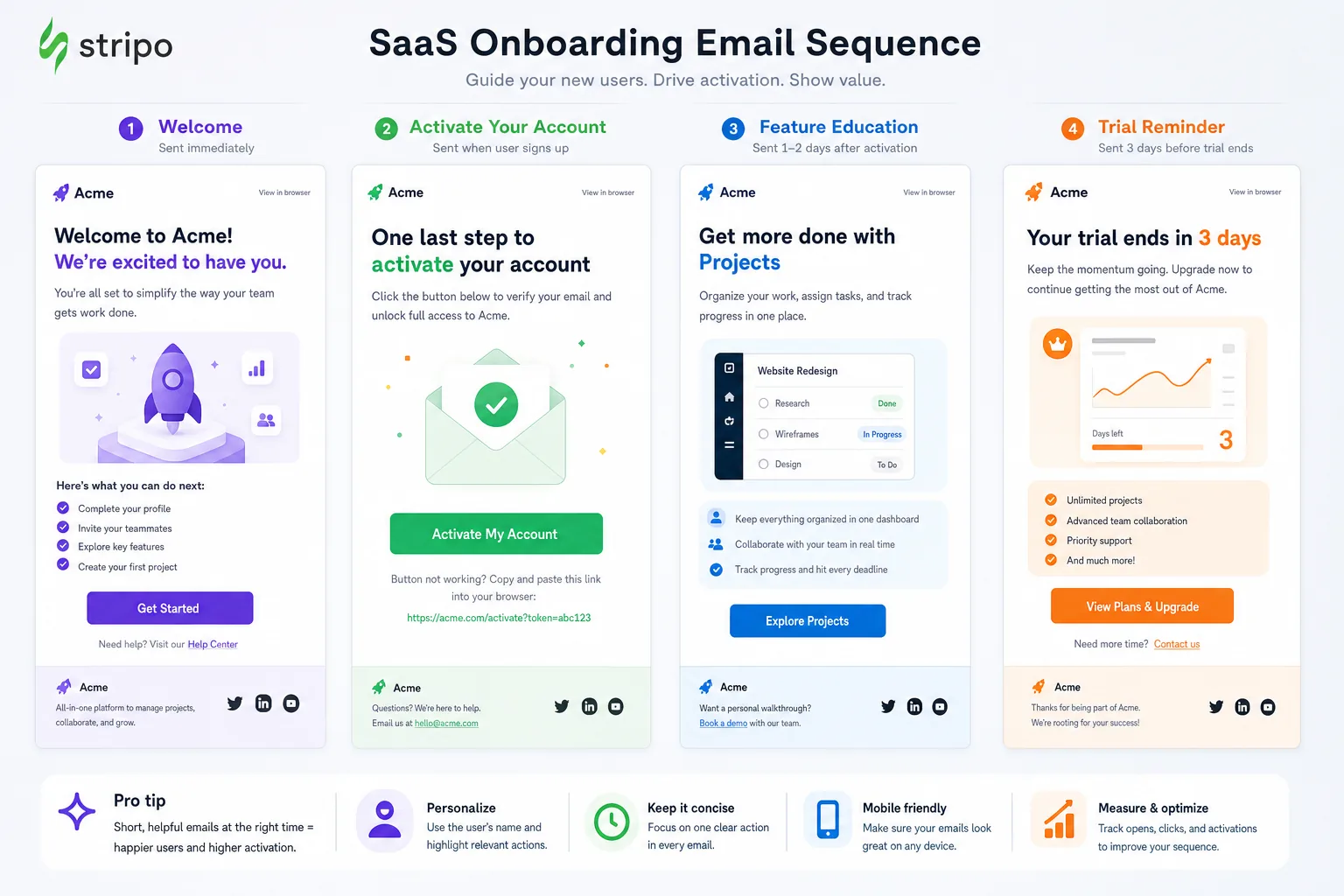
A first-login email is usually the simplest onboarding structure. Its job is to bring the user back into the product quickly. The layout can be lean: a short welcome message, one sentence explaining the value of entering the app, and a prominent CTA. A small supporting line can tell the user what they will do after clicking, such as choosing preferences or creating a workspace.
This structure works best when the email avoids overexplaining the product. The user has just signed up, so they do not need a full feature tour in the inbox. They need momentum. Keep the message short, place the CTA high, and use design to remove hesitation.
Profile completion email
A profile completion email should connect the task to a better product experience. Asking for more information can feel like admin work, so the email needs to explain the payoff. The layout can lead with a benefit statement, followed by a compact list of what completing the profile unlocks.
For example, a profile completion structure might include a heading, two to three bullets, and a CTA such as “Complete your profile.” If the task is quick, state that clearly. If the profile affects recommendations, permissions, billing, or collaboration, explain that in live text. Avoid using an image-only checklist because users with images blocked should still understand what information is needed.
Integration connection email
Connecting an integration is often a higher-friction activation step. The user may worry about permissions, data accuracy, or setup time. This email can be slightly longer because the task requires more reassurance. A strong structure includes the benefit, the setup steps, a trust cue, and one primary CTA.
The layout might include a simple three-step module: choose the integration, approve access, confirm the sync. Icons can help distinguish the steps, but the instructions should remain in text. If a UI screenshot is included, it should support the instructions rather than replace them. The CTA should be specific, such as “Connect Google Analytics” or “Sync your CRM,” depending on the product context.
For more context, according to Nielsen Norman Group offers additional background on this topic.
Invite teammates email
Team invitation emails need to shift the user’s mindset from individual setup to shared value. The design should show why inviting others helps the product become more useful. A common pattern is to lead with the collaboration benefit, then show the roles or outcomes unlocked by adding teammates.
See also: Really Good Emails alternatives
This structure often works well with a lightweight comparison: before inviting teammates, the user manages work alone; after inviting teammates, they can assign tasks, share dashboards, approve workflows, or centralize communication. Keep the comparison brief. The CTA should focus on the action, such as “Invite your team.”
Setup checklist email
A setup checklist email is useful when activation requires multiple steps. The risk is that the email becomes too dense. The best version uses a clear progress-oriented layout with three to five items maximum. Each item should be short, concrete, and ordered by importance.
If one step is the most valuable, make that step the primary CTA and treat the rest as supporting context. Do not ask users to click five different buttons with equal weight. A checklist should create clarity, not decision fatigue. For mobile readers, use ample spacing between items so the checklist is easy to scan and tap.
Design choices that improve clarity, trust, and action
Good onboarding design is not decoration. It is a usability layer. Every visual decision should make the next step easier to understand and complete. This is especially important because email clients vary widely in how they render layouts, images, fonts, and CSS.
Contrast is one of the clearest ways to improve action. The primary button should stand out from the background and surrounding content. A pale button on a light background may look elegant in a design file, but it can become difficult to see in a crowded inbox environment or on a dim mobile screen. Use contrast deliberately for hierarchy, not just brand expression.
Text readability also matters across both light and dark contexts. Many subscribers use dark mode, and some email clients may transform colors in ways that affect legibility. Avoid placing essential text inside decorative images. If an illustration, hero graphic, or UI mockup fails to load, the user should still understand the activation step from the live text.
Illustrations can make onboarding feel friendly, but they should not push the primary message below the fold. UI screenshots can be powerful when the action is interface-specific, such as connecting an integration or creating a dashboard. However, screenshots should be cropped tightly, annotated sparingly, and supported with written instructions. A large, detailed screenshot that requires pinching and zooming on mobile can create more confusion than clarity.
Color palettes should reinforce the brand without competing with the CTA. If every module uses a different accent color, the user may not know where to look. A restrained palette can create a stronger sense of sequence: neutral background, readable text, one brand accent, and a high-contrast CTA color. This is particularly useful in onboarding flows where users receive multiple emails over several days. Consistent visual language helps the sequence feel coherent.
Accessibility should be built into the design process, not checked only at the end. Use readable font sizes, clear headings, descriptive button text, logical reading order, and sufficient contrast. Leave room here for one authoritative citation on accessibility or email client rendering guidance when the article is updated with sources. The key principle is simple: the email should still communicate its purpose when images are blocked, styles are partially unsupported, or the user relies on assistive technology.
The strongest onboarding emails are designed for imperfect inbox conditions. They remain understandable when images fail, layouts stack, colors shift, or the reader only scans the first screen.
How to adapt onboarding email inspiration to your own SaaS flow
Inspiration becomes useful when it is mapped to your product’s activation path. Before adapting a design pattern, identify the milestone that matters. Is the goal to get the user into the product for the first time, complete account setup, add data, invite a teammate, install code, or publish something? The milestone determines the message.
Next, choose one primary user action. This is where many onboarding emails lose clarity. A welcome email might ask the user to watch a video, read documentation, join a webinar, complete setup, and follow the company on social media. Each option may be reasonable on its own, but together they dilute the email’s purpose. If the activation goal is setup, the primary CTA should support setup. Everything else should be secondary or removed.
Then decide what reassurance the user needs before clicking. A low-friction task may need almost none. A high-friction task, such as connecting a data source, may need reassurance about time, permissions, privacy, or reversibility. Add only the reassurance required to move the user forward. Do not fill the email with generic motivational copy that could apply to any product.
The product category should also shape the layout. A project management tool may need onboarding emails that emphasize collaboration and team invitations. A developer platform may need concise technical steps and clear documentation pathways. A finance or security product may need stronger trust cues and careful language around access. A design or analytics tool may benefit from UI screenshots that show what the finished state looks like.
User role matters as well. An admin needs different onboarding guidance than an end user. A founder may care about speed to value, while an operations manager may care about team adoption and process consistency. If your SaaS product serves multiple roles, consider segmenting onboarding emails so the design and copy reflect the user’s job rather than sending one generic sequence to everyone.
Use this quick evaluation framework when reviewing your own drafts:
- Goal: Can you name the activation milestone this email supports?
- Action: Is there one primary CTA that maps directly to that milestone?
- Hierarchy: Can a reader understand the purpose by scanning the heading, first paragraph, and button?
- Friction: Does the email answer the main objection or uncertainty before the click?
- Layout: Does the structure remain clear on a narrow mobile screen?
- Fallback: Does the email still make sense if images are blocked?
This approach helps you borrow from SaaS onboarding email examples without copying surface-level style. The goal is not to make your email look like another brand’s campaign. The goal is to identify the pattern behind the design and adapt it to your product’s activation moment.
Checklist for evaluating SaaS onboarding email design
Before publishing an onboarding email or sequence, review it with a practical design and lifecycle checklist. This is especially useful when comparing inspiration examples and deciding which patterns belong in your own flow.
- Clear activation goal: The email supports one milestone, such as first login, integration setup, profile completion, team invitation, or checklist progress.
- Relevant subject line and preview text: The inbox copy explains the value or task clearly, without relying on vague hype.
- Scannable structure: The email can be understood through the heading, short body copy, supporting bullets, and CTA.
- Single dominant CTA: The main button is visually obvious and uses specific action language.
- Strong above-the-fold hierarchy: The user sees the core message and next step early, especially on mobile.
- Mobile-friendly spacing: Text, buttons, and modules have enough room to be read and tapped comfortably.
- Accessible typography: Font sizes, line spacing, contrast, and reading order support quick comprehension.
- Fallback-safe imagery: Important instructions are in live text, not trapped inside screenshots or illustrations.
- Purposeful visuals: Icons, illustrations, and UI screenshots clarify the action rather than decorate the layout.
- Limited color palette: Brand colors support hierarchy and do not compete with the primary CTA.
- Stage-matched copy: The message reflects what the user has already done and what they need to do next.
- Email client awareness: The design avoids depending on fragile CSS, image-only content, or desktop-only layouts.
The best SaaS onboarding email examples are not just attractive. They guide users toward a specific next action with minimal friction and maximum clarity. As you browse examples, compare the layout patterns, CTA treatment, content hierarchy, and mobile behavior. Then use the checklist to turn inspiration into an onboarding sequence that is responsive, accessible, and aligned with your product’s activation goals.
See also: interactive email inspiration